


How To Make Comment Bubble At Top Of Blogger Posts,as you have seen it using in many blogs and i am sure you would not be knowing how to make and show that comment bubble count and link at top of the blogger post.So that's why i am here to make you learn it,and add it to your blogs.As its not as difficult as you might be thinking of.
For demo of comment bubble you can check the my blog as i have comment bubble
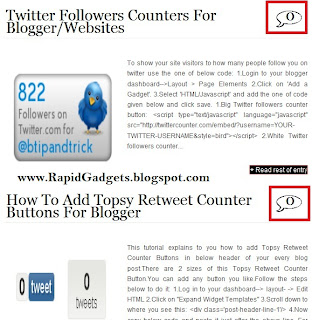
Now To make comment bubble,Just
Login to blogger > Then go to Layout > Edit/Html > Expand Widgets > Press Ctrl+F
And Search For ]]></b:skin> tag and place the below codes before it.
.comment-bubble {
float : right;
width : 48px;
height : 48px;
background : url(http://i43.tinypic.com/dljpzo.jpg) no-repeat;
font-size : 18px;
margin-top : -15px;
margin-right : 2px;
text-align : center;
position:absolute;
padding:0px 0px 0px 0px;
}
In red above is the image link of bubble,you can use yours and don't forget to change its width and height also of the image you use.To adjust the bubble position you can edit the distance from margin-right and margin-top properties of css.
Some Readers had problem in aligning the comment number in comment bubble.To adjust it just edit padding values according to you in above css.I have added four 0 values to padding,First one is for padding-top,Second for padding-left,third for padding-bottom and last for padding-right.
Now after adding above css just find the below codes and add the red codes in between them as i have shown below.
<b:includable id='post' var='post'>
<div class='post hentry uncustomized-post-template'>
<a expr:name='data:post.id'/>
<b:if cond='data:post.title'>
<h3 class='post-title entry-title'><b:if cond='data:post.allowComments'>
<a class='comment-bubble' expr:href='data:post.addCommentUrl' expr:onclick='data:post.addCommentOnclick'><data:post.numComments/></a>
</b:if>
<b:if cond='data:post.link'>
<a expr:href='data:post.link'><data:post.title/></a>
<b:else/>
<b:if cond='data:post.url'>
<a expr:href='data:post.url'><data:post.title/></a>
<b:else/>
<data:post.title/>
</b:if>
</b:if>
</h3>
</b:if>
Afer adding red codes in between them just preview your template,if comment bubble is ok,just save your template and you are done.Now you have added an comment bubble to bog in an very easy way you wouldn't have thought of.Enjoy this hack and let me know you liked it or not.
And Friends i will try to schedule one or two posts for you,but that for sure will be small blogger tutorials which also will be very useful for you to learn a lot.
For demo of comment bubble you can check the my blog as i have comment bubble
Login to blogger > Then go to Layout > Edit/Html > Expand Widgets > Press Ctrl+F
And Search For ]]></b:skin> tag and place the below codes before it.
.comment-bubble {
float : right;
width : 48px;
height : 48px;
background : url(http://i43.tinypic.com/dljpzo.jpg) no-repeat;
font-size : 18px;
margin-top : -15px;
margin-right : 2px;
text-align : center;
position:absolute;
padding:0px 0px 0px 0px;
}
In red above is the image link of bubble,you can use yours and don't forget to change its width and height also of the image you use.To adjust the bubble position you can edit the distance from margin-right and margin-top properties of css.
Now after adding above css just find the below codes and add the red codes in between them as i have shown below.
<b:includable id='post' var='post'>
<div class='post hentry uncustomized-post-template'>
<a expr:name='data:post.id'/>
<b:if cond='data:post.title'>
<h3 class='post-title entry-title'><b:if cond='data:post.allowComments'>
<a class='comment-bubble' expr:href='data:post.addCommentUrl' expr:onclick='data:post.addCommentOnclick'><data:post.numComments/></a>
</b:if>
<b:if cond='data:post.link'>
<a expr:href='data:post.link'><data:post.title/></a>
<b:else/>
<b:if cond='data:post.url'>
<a expr:href='data:post.url'><data:post.title/></a>
<b:else/>
<data:post.title/>
</b:if>
</b:if>
</h3>
</b:if>
Afer adding red codes in between them just preview your template,if comment bubble is ok,just save your template and you are done.Now you have added an comment bubble to bog in an very easy way you wouldn't have thought of.Enjoy this hack and let me know you liked it or not.
And Friends i will try to schedule one or two posts for you,but that for sure will be small blogger tutorials which also will be very useful for you to learn a lot.

